All reservation requests appear as Leads. Review them quickly so your team can confirm bookings and fill tables faster.
Web
Open the sidebar and click Leads.
You can sort by name, date submitted, event date, guest count, arrival time, attribution, and notes. You can also search and filter by date range, attribution, and status (Pending, In Progress, Approved, or Denied).
Lead statuses
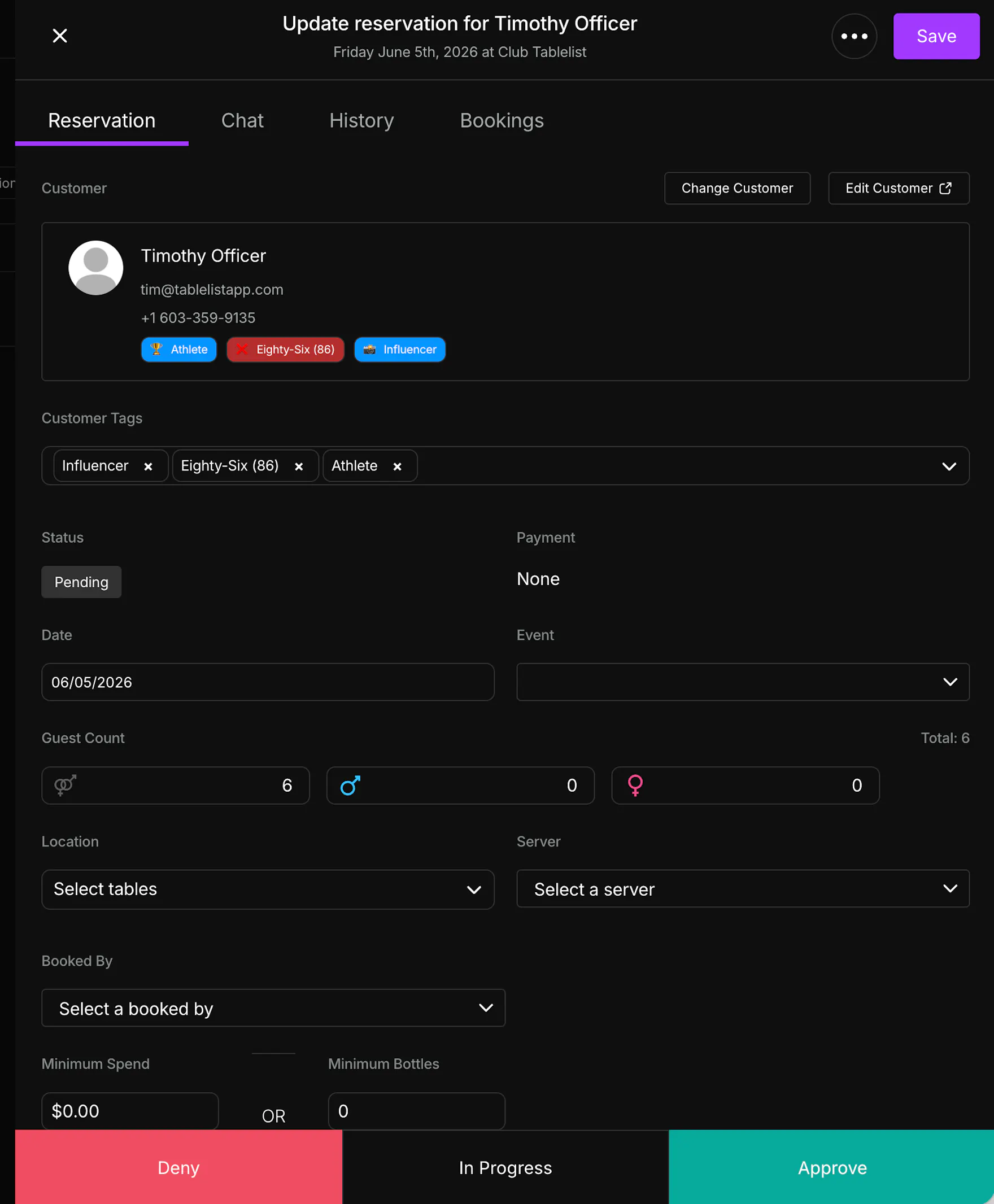
- Deny, mark In Progress, or Approve
- Update attribution, minimum, and notes
- Generate a payment link
- Assign a VIP table
In Progress means someone on your team is working the lead. It does not approve or deny the request. The slideout closes, and the Leads table shows In Progress with the date and time it was marked underneath. You can reopen the lead later to approve or deny.
Approved or denied leads are removed from the Leads tab.
Approved or denied leads are removed from the Leads tab. In Progress and Pending leads remain until you take final action.
iOS
Select the date and tap the purple number icon at the top to open inbound leads.
From each lead, you can approve/deny, update attribution/minimum/notes, generate a payment link, and assign a VIP table.
Approved or denied leads are removed from the Leads tab.


Android
Android follows the same lead workflow as iOS.
UI details may vary slightly by device, but lead actions and behavior are the same.